Introduction
SkillHub is a self-hosted registry for distributing and governing Agent skills. Authors submit packages containing SKILL.md; the registry stores versions and applies access control, scanning and review workflows. Consumers discover skills through the website and install files into a target Agent's skill directory through the CLI. This page explains responsibilities and object selection for consumers, authors and operators; it does not replace operational guides.
Registry responsibilities and boundaries
The registry addresses fragmented sources, inconsistent versions and missing controls over access and publication. It manages distributable skill files, versions and governance records. It does not directly execute installed skills on the registry server.
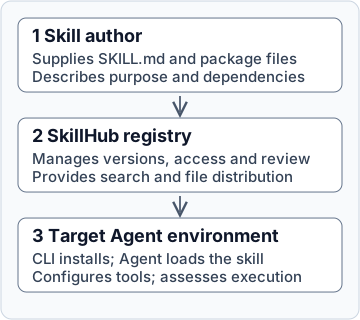
Figure: the registry receives, governs and distributes packages. The target Agent environment loads and executes installed skills.
| Operation | Registry responsibility | Consumer or author responsibility |
|---|---|---|
| Submission and publication | Validate packages and advance scanning, review and publication according to configuration | Supply instructions, dependency requirements and verifiable content; resolve rejection or failure |
| Discovery and download | Provide search, details and downloadable versions according to resource state and access permissions | Check purpose, source, version and target environment; visible details do not establish installability |
| Installation and execution | The CLI downloads files and maintains local installation records | Confirm Agent discovery, configure runtime dependencies and assess execution results |
| Updates and governance | Manage versions and governance states such as hiding or archiving | Inspect local changes and upgrade plans; remote governance does not automatically recall downloaded files |
A skill is not a hosted running application, and installation does not start a service. Scan results and review records do not certify execution quality or compliance: a scan reports checks under its particular task and policy. Suitability still requires verification in the actual Agent environment.
Distinguish Skills, Skill Suites and Suite Bundles
These objects apply to different stages and are not interchangeable. A Skill Suite pins exact versions of member Skills and designates one member as its entry. A Suite Bundle is an authoring format for importing members and a suite definition together.
| Object | Stored or described content | Distinction from adjacent objects |
|---|---|---|
| Skill | A package centered on SKILL.md and its versions | Independently installable; association with a suite does not require installing every member |
| Skill Suite | Member coordinates, exact versions and an entry Skill | An installation collection, not a workflow execution engine; members remain separate directories |
| Suite Bundle | SUITE.yaml with member directories to upload, or references to published member versions | An authoring and import input, not an Agent executable; member review is not bypassed |
For example, processing meeting materials may require separate intake and summary Skills. Installing the summary Skill is sufficient for the independent summary task. Joint distribution can use a Skill Suite that pins both member versions and designates intake as the entry. A Suite Bundle is appropriate when the author must upload local members together. This example illustrates the relationship; it does not promise that resources with these names exist. Installing the suite does not execute the two steps automatically: cooperation depends on the entry and member instructions and the Agent.
The object definitions are grounded in the Skill Suite member model and Suite Bundle definition.
Select an object and entry point
| Goal | Selection | Decision basis and next action |
|---|---|---|
| Install one skill for an independent task | Skill | No member combination needs pinning; follow the quickstart to verify installation and Agent discovery |
| Distribute several skills as a fixed-version collection | Skill Suite | A stable member combination and entry are required; check member installability in Skill Suites |
| Upload several local skills and assemble a suite | Suite Bundle | Import a definition, preview differences and create member versions; follow Bundle import |
| Manage visibility, membership and review | Namespace and governance workflows | Platform roles do not imply namespace roles; start with the prerequisites in namespace management |
Installing and using skills does not require deploying a registry or preparing a Suite Bundle first. Publication follows the applicable preparation, submission, scanning, review and publication-confirmation path. Upload completion does not mean that the whole workflow has finished; the entry point is publishing and version management.
Deployment forms and technical components
An accessible existing instance can be used through its website and the CLI. Self-hosting requires operating services, the database, session storage and skill-file storage, with the required authentication and scanning capabilities configured. External identity providers, scanners and other external services depend on instance configuration; self-hosting does not imply that all external requests are disabled.
| Component | Technology or implementation | Purpose and configuration boundary |
|---|---|---|
| Website and backend | React, Vite; Java, Spring Boot | The website provides controls; the backend enforces API and business rules |
| Database and session storage | PostgreSQL, Redis | Store business records and support server sessions; operational planning must also include skill files |
| Skill-file storage | Local files or S3-compatible storage | The backend selects a provider through deployment configuration; selecting a provider does not migrate existing data |
| Deployment paths | Deployment script, release Compose, Kustomize, Helm | Each has its own configuration entry point; upgrade commands and persistence configuration must not be mixed |
These components are grounded in release Compose and the backend modules. For self-hosting, select a path through the documentation navigator. Integrators must distinguish registry APIs from the actual Agent execution environment; see Runtime integration for the contract boundary.