Review & Governance
Overview
SkillHub provides a complete review workflow to ensure that skill packages published to the registry comply with team standards.
The review mechanism operates on two levels:
- Namespace Review: Team administrators review skill packages within their namespace
- Platform Review: Platform administrators review skill packages promoted to the global scope
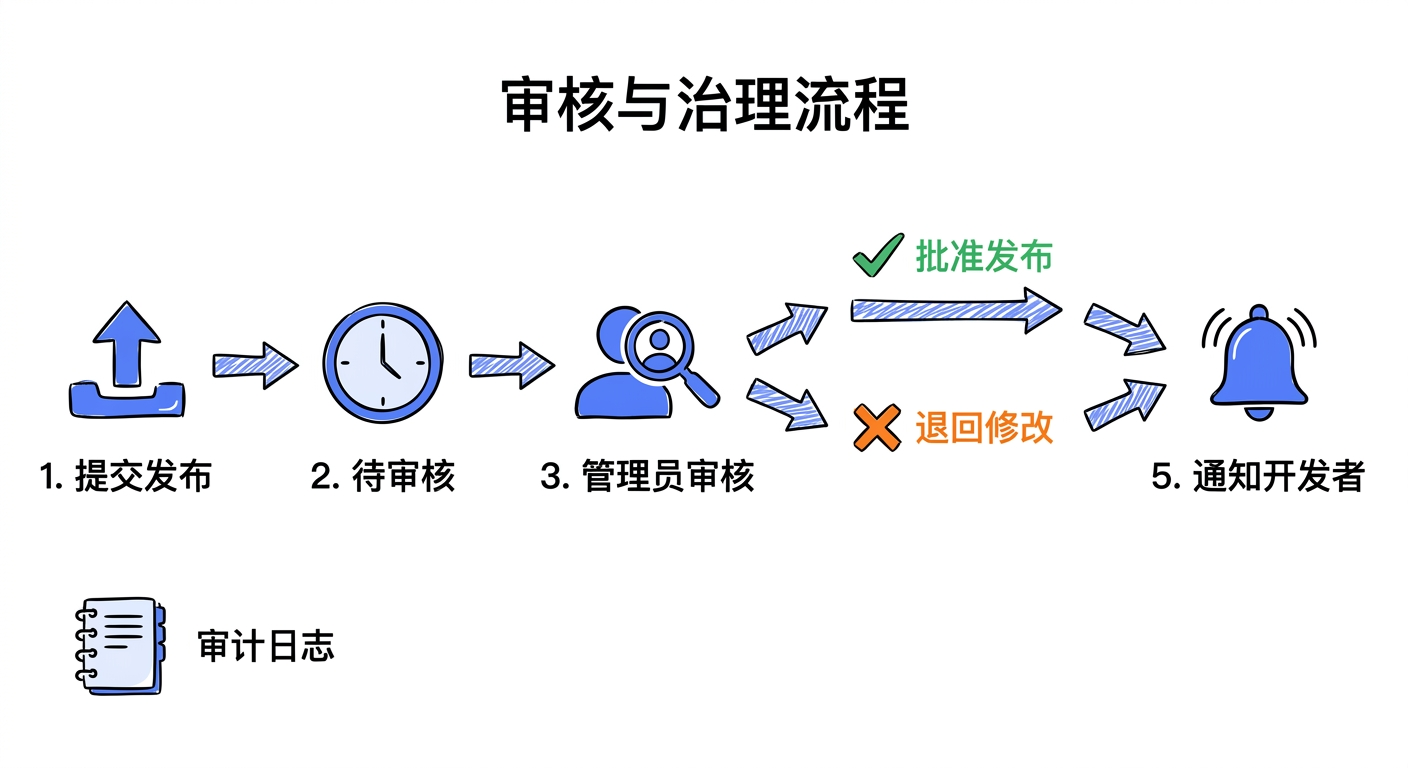
Review Process:
- A developer publishes a skill package -> it enters the "Pending Review" state
- An administrator receives a notification -> reviews the skill package details
- The administrator makes a decision -> approve or reject
- Upon approval -> the skill package is officially published
- Upon rejection -> the developer receives feedback and can revise and resubmit
Review Statuses:
| Status | Description |
|---|---|
| PENDING | Awaiting review |
| APPROVED | Approved |
| REJECTED | Rejected |
| WITHDRAWN | Withdrawn |
Governance Features:
- Review Workflow: Multi-level review, batch review
- Reporting System: Users can report inappropriate skill packages
- Promotion Management: Promote namespace skill packages to the global scope
- Audit Logs: All governance actions are recorded
Use Cases
Case 1: Namespace Administrator Review
A team administrator reviews skill packages submitted by team members to ensure compliance with team standards.
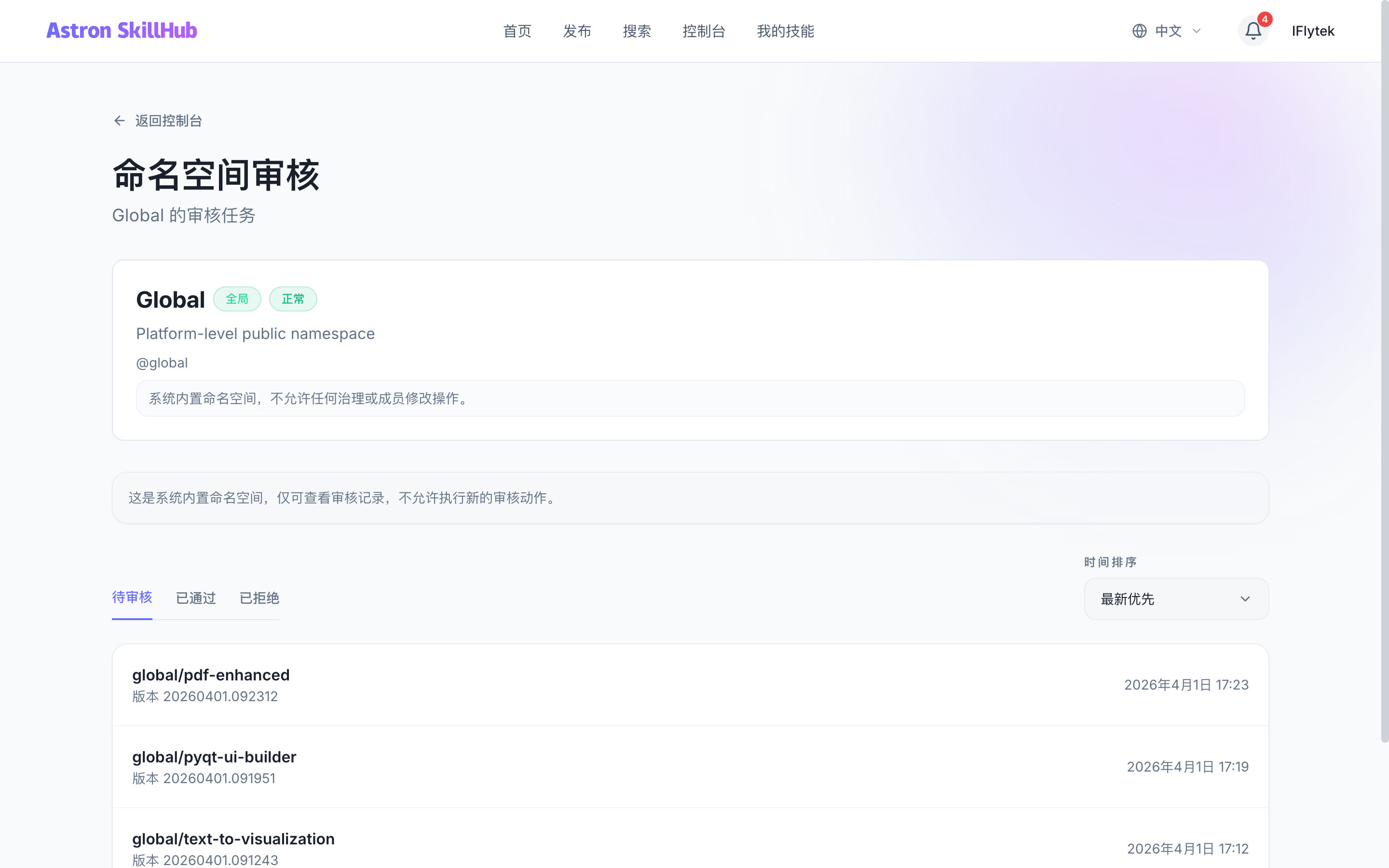
Case 2: Platform Administrator Reviews Promotions
A platform administrator reviews skill packages being promoted from a namespace to the global scope.
Case 3: Report Handling
A user reports an inappropriate skill package, and an administrator investigates and takes action.
Case 4: Batch Review
An administrator batch-approves multiple skill packages that meet the standards.
Step-by-Step Guide
Submitting for Review:
- When a skill package is published, the system automatically creates a review task
- The developer can check the review status under "My Submissions"
- Wait for an administrator to review
Reviewing Skill Packages:
- Navigate to
/dashboard/reviews - View the pending review list
- Click on a skill package to view details:
- Review metadata (name, description, version)
- Browse the file list
- View file contents online
- Download the full package for local testing
- Review the compliance snapshot and the diff from the previous published version
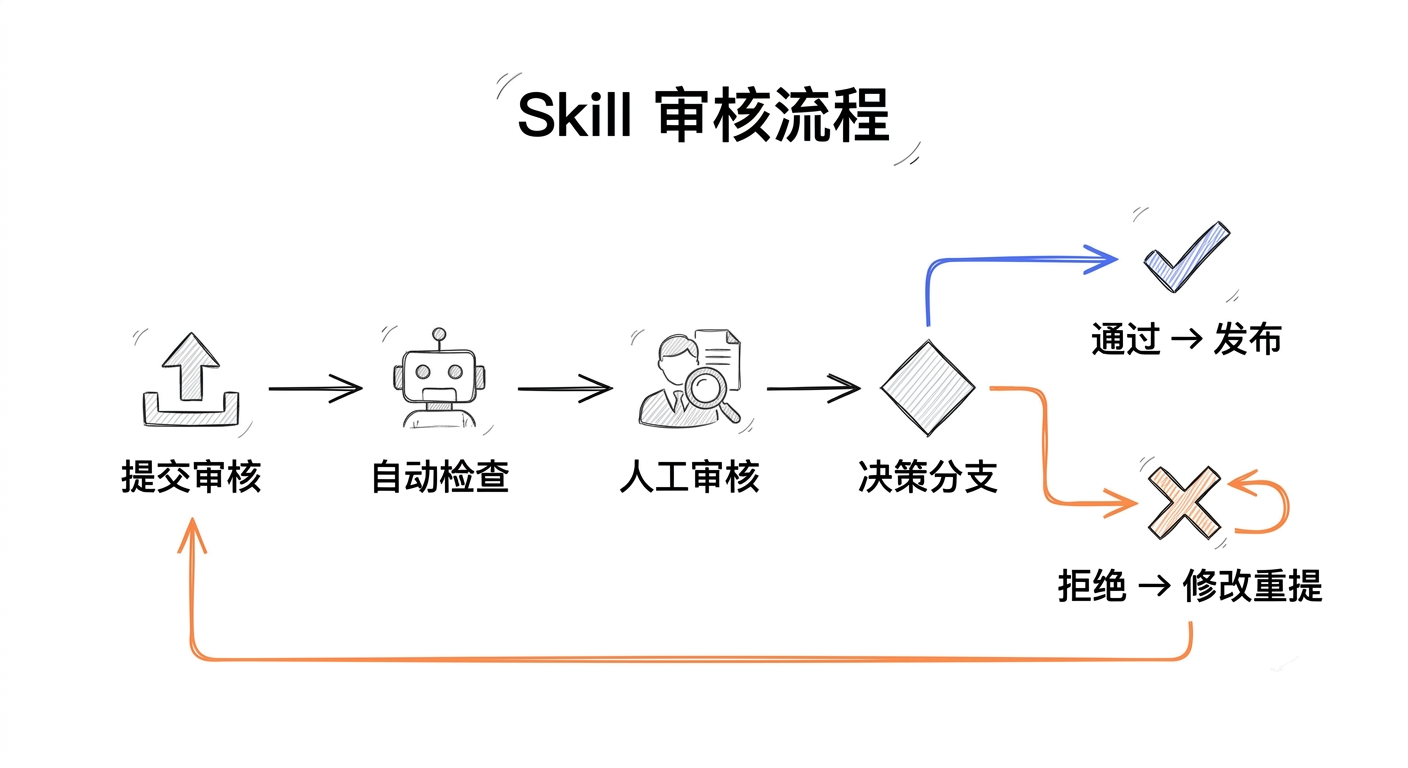
Make a decision:
- Approve: The skill package is officially published and the developer is notified
- Reject: Provide a rejection reason; the developer can revise and resubmit
Add review comments (optional)
Reviewing Compliance Declarations:
If the pending version contains x-astron-compliance, the review detail page shows the version-level compliance snapshot and a diff summary:
- Added declarations: standards, controls, or evidence newly added by the pending version.
- Removed declarations: declarations that existed in the previous published version and are no longer present.
- Modified declarations: standard metadata, control title, or evidence changed.
- Digest changes:
complianceSnapshot.digestchanged, which means the normalized declaration content changed.
Review guidance:
- Check whether each declaration matches the actual skill behavior. For example, a security response skill that declares a MITRE ATT&CK technique should provide supporting documentation or packaged evidence.
- Expand diff items to inspect evidence paths, external links, and digests instead of relying only on the declaration title.
- Treat removals and broad rewrites as higher-priority review items because downstream audit systems may reference those snapshots.
- Reject the submission if evidence is missing, paths are inaccessible, or declarations clearly do not match the skill capability.
SkillHub guarantees structural validation, traceable evidence references, and immutable version snapshots. It does not certify that the author's declaration is objectively compliant.
Withdrawing a Review:
If a developer discovers an issue, they can withdraw the submission before it is approved:
- Navigate to "My Submissions"
- Find the skill package pending review
- Click "Withdraw"
- Confirm the withdrawal
Deleting a Promoted Skill
If permanent deletion reports "Use the reviewed revocation workflow to remove a promoted skill", manage the global publication from the source team skill's detail page. Hiding, archiving, or withdrawing a pending submission does not remove an approved global skill. Submitting a revocation request does not complete revocation either.
- Open the source skill, such as
@it/translate-document. In "Promote to Global", choose "Request global revocation", enter a reason, and confirm. - Ask a platform
SKILL_ADMINorSUPER_ADMINto open "Revocations to review" at/dashboard/promotions, verify the source and global skill, and choose "Approve revocation". ASKILL_ADMINcannot review their own request; aSUPER_ADMINcan. - Refresh the source skill and check that the current request shows "Revoked" (
APPROVED) in "Revocation history".PENDINGorREJECTEDmeans that this request has not completed revocation; ordinary deletion remains blocked while an active global link exists. A historical request's status is not a substitute for checking the current promotion relationship. - Approval deletes the linked
@global/translate-documentand all its global versions while keeping the source team skill. To remove the source too, use its permanent-delete action afterward with the required deletion permissions.
A platform SKILL_ADMIN or SUPER_ADMIN can also choose "Revoke directly as admin" on the source detail page when no revocation request is pending. Confirmation completes global revocation immediately and retains the revocation record. When a request is already pending, the detail page only shows its pending status; handle it through "Revocations to review" as described above. Check the confirmation carefully: this removes the entire global skill, including independently uploaded global versions, ratings, and statistics. Installed client files cannot be recalled, and another skill may later use the same address.
If the revocation record is already APPROVED but the same error persists after refreshing, record the source/global skill IDs, revocation request ID, deployed version or image tag, and the deletion response and request ID. Also check whether a new global promotion was approved after revocation. If the revocation controls are missing, first verify that the deployment and database migrations match the intended version and ask a maintainer to investigate. Do not edit promotion relationships directly in the database to bypass the workflow.
Handling Reports:
- Navigate to
/dashboard/reports - View the report list
- Investigate the reported content
- Take action (archive the skill package, warn the user, etc.)
API Reference
Submit for Review:
POST /api/v1/reviews
Content-Type: application/json

{
  "skillVersionId": "version-123"
}
Approve a Review:
POST /api/v1/reviews/{id}/approve
Content-Type: application/json

{
  "comment": "Looks good! Approved."
}
Reject a Review:
POST /api/v1/reviews/{id}/reject
Content-Type: application/json

{
  "comment": "Please fix the documentation and add more examples."
}
Parameter Reference:
| Parameter | Type | Description |
|---|---|---|
| id | string | Review task ID (path parameter) |
| comment | string | Review comment (optional, max 1000 characters) |
List Pending Reviews:
GET /api/v1/reviews/pending?namespaceId=ns-123&page=0&size=20List My Submissions:
GET /api/v1/reviews/my-submissions?page=0&size=20Get Review Details:
GET /api/v1/reviews/{id}Get Skill Package Details Under Review:
GET /api/v1/reviews/{id}/skill-detailDownload Review Package:
GET /api/v1/reviews/{id}/downloadWithdraw a Review:
POST /api/v1/reviews/{id}/withdrawReport a Skill Package:
POST /api/v1/skills/{namespace}/{slug}/reports
Content-Type: application/json

{
  "reason": "INAPPROPRIATE_CONTENT",
  "details": "This skill contains malicious code"
}
Notes
Review Permissions: Only namespace Admins and Owners can review skill packages within their namespace. Platform administrators can review all skill packages.
- Review Turnaround: It is recommended to complete reviews within 24 hours to avoid blocking developers
- Review Records: All review actions are recorded in the audit log
- Compliance Audit: Compliance declarations are recorded as version snapshots. Approval or rejection should consider the diff summary, but Agent execution traces are not recorded by SkillHub
- Batch Review: Administrators can batch-approve multiple skill packages
- Review Comments: When rejecting, it is recommended to provide detailed improvement suggestions
- Withdrawal Restrictions: Only skill packages in the pending review state can be withdrawn